Slow internet in rural Jamaica is a real problem. If you live in the hills of St. Ann, deep in Westmoreland, or far from a major town, you know the pain. Flow and Digicel cables don’t reach everywhere. Mobile data drops out. Work-from-home becomes a nightmare.
Starlink changes that. It’s satellite internet from SpaceX. It sends your signal through space, not cables. So it works almost anywhere on the island.
But here’s what most guides won’t tell you: Starlink Jamaica‘s residential service is currently sold out. New users can’t just sign up and get connected today. This guide tells you exactly what the situation is, what plans are still available, and the smartest steps to take right now.
What Is Starlink and How Does It Work?
Starlink is a satellite internet service run by SpaceX. It uses thousands of small satellites in low-Earth orbit (LEO). These sit about 550 km above Earth — much closer than older satellite systems.
Why does that matter? Lower orbit means lower lag time. Old satellite internet had latency of 600+ milliseconds. That made video calls choppy and gaming impossible. Starlink’s latency is just 20–60 ms. That’s fast enough for Zoom, Netflix, and online games.
Here’s how it works in simple steps:
- Your dish (called the terminal) sits outside your home
- It connects to the nearest Starlink satellites overhead
- Those satellites beam your data to ground stations
- You get fast internet, even in remote areas
The dish is self-aligning. You don’t have to point it yourself. It finds the satellites on its own. You just need a clear view of the sky.
Is Starlink Available in Jamaica Right Now? (2026 Update)
This is the most important question — and the answer is not simple.
Starlink covers all of Jamaica. Every parish. Kingston, Montego Bay, Portland, Westmoreland, the Blue Mountains — all covered.
But residential service is sold out.
As of mid-2026, Starlink has hit its capacity limit for residential users in Jamaica. Too many people signed up. The network got full. New users now see this message when they try to activate:
“No services are available at this address. Please try a different address.”
This is not a hardware issue. It’s not about where you bought the dish. It’s a network capacity issue affecting the whole island.
Here’s what happened in stages:
- Starlink launched in Jamaica around 2022–2023
- Demand grew fast across the island
- Residential slots filled up
- Roaming plans were used as a workaround — then those got cut off too
- Now, no standard consumer plan can be activated for new users
What does this mean for you?
| Plan Type | Status in Jamaica (2026) |
|---|---|
| Residential | Sold out — join waitlist only |
| Roaming Unlimited | No longer available for new users |
| Roaming 50GB | No longer available for new users |
| Land Mobility (50GB) | Still activatable — starts at ~JMD $7,600/mo |
| Business / Priority | Still available — starts at ~JMD $7,600/mo |
| Maritime | Still available — higher cost |
The good news? Capacity can reopen. When SpaceX launches more satellites and expands coverage, spots open up. It can happen with little warning.
Starlink Jamaica Pricing: Full Breakdown (2026)
Here’s what Starlink costs in Jamaica right now:
Hardware Costs
| Kit | Estimated Price in JMD |
|---|---|
| Starlink Standard Kit (via starlink.com) | ~JMD $63,000 (includes shipping & customs) |
| Starlink Mini Kit (via starlink.com) | ~JMD $38,000 |
| Standard Kit from local retailers | JMD $90,000–$150,000 |
Tip: Always buy direct from starlink.com if you can wait 1–3 weeks. Local resellers charge much more.
Monthly Plan Costs
| Plan | Monthly Cost (JMD) | Notes |
|---|---|---|
| Residential (when available) | JMD $7,450 | Unlimited data — price increased May 2026 |
| Land Mobility 50GB | ~JMD $7,600 | Can still be activated in Jamaica |
| Roaming Unlimited | ~JMD $16,000 | Not available for new activations |
| Business Priority (50GB) | ~JMD $7,600+ | Available, priority speeds |
Important price update: Starlink raised its residential price in Jamaica from JMD $7,000 to JMD $7,450 per month, effective June 2026. The company says this reflects rising operating costs and ongoing network expansion.
Existing users keep unlimited data for 4K streaming, gaming, and video calls.
How to Get Starlink in Jamaica Today (Your Options)?
You have three paths right now. Pick the one that fits your situation.
Option 1: Join the Residential Waitlist
This is the official route for home users.
- Go to starlink.com and enter your Jamaican address
- You’ll be asked to pay a deposit of around JMD $8,500
- This holds your spot in line
- When capacity opens in your area, Starlink notifies you
- You then complete your order
There’s no set timeline. It could be weeks. It could be months. New satellites were launched in early 2026 but didn’t immediately fix Jamaica’s capacity issue. Stay patient and stay on the list.
Option 2: Use the Business Plan
If you need internet now and cost is not the main concern, the Starlink Business (Priority) plan is still available in Jamaica.
- Starts at around JMD $7,600/month
- Priority data — your speeds are protected even when the network is busy
- 24/7 support
- Includes a public IPv4 address
- Great for small businesses, hotels, Airbnbs, remote offices
This is the one plan type that bypasses the residential capacity issue.
Option 3: Land Mobility Plan
The Land Mobility plan starts at JMD $7,600 for 50GB. It was designed for vehicles and on-the-go use. It’s not ideal as a permanent home internet fix, but it does work in Jamaica right now for new activations.
It costs more per GB than residential, so it’s best for people who need moderate data use and can’t wait.
How to Set Up Starlink in Jamaica (Step-by-Step)?
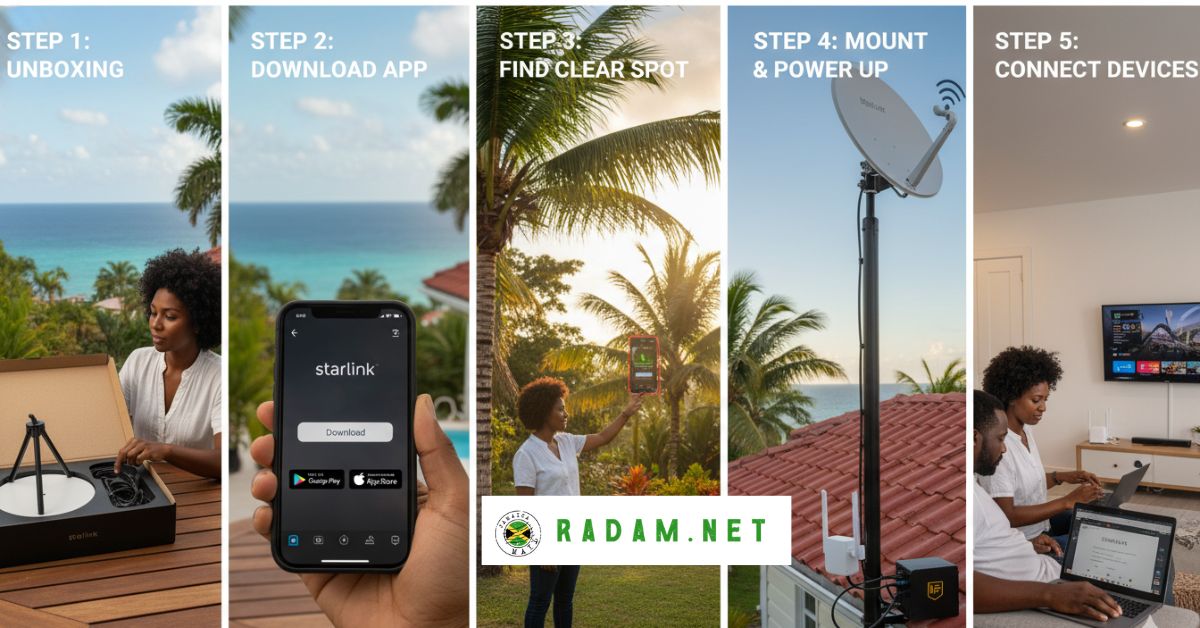
Once you have an active plan, setup is simple. Here’s exactly what to do.
Step 1: Unbox the Kit
Your kit includes:
- The dish (the flat, round antenna — sometimes called “Dishy”)
- A Wi-Fi 6 router with two built-in Ethernet ports
- A power cable
- A mounting stand
The Gen 3 router covers up to 3,200 sq ft. It supports multiple devices at once.
Step 2: Download the Starlink App
Get it on iOS or Android before you plug anything in. The app is how you:
- Check for obstructions (trees, rooftops, hills)
- Configure your Wi-Fi name and password
- Monitor your speeds and connection
Step 3: Find a Clear Spot for the Dish
This is the most critical step. The dish needs a clear, unobstructed view of the sky. Aim it north-facing if possible.
Use the app’s obstruction scanner. Point your phone at different spots around your yard. It shows you where palm trees, rooftops, or hillsides might block your signal.
Even a small obstruction can cut your speeds. Take your time with this step.
Step 4: Mount and Power Up
The kit comes with a basic kickstand for ground mounting. For a roof or wall mount, you’ll need an extra bracket (available from Starlink’s shop or local suppliers). Roof mounts in Jamaica run around JMD $12,600.
Once mounted, plug the dish into the router and power up. The dish aligns itself automatically within a few minutes.
Step 5: Connect Your Devices
Open the Starlink app and follow the prompts to set up your Wi-Fi. Then connect your phone, laptop, TV, or smart devices.
Power Outage Tip
Jamaica has frequent power cuts. Add a UPS (uninterruptible power supply) to keep your Starlink running during outages. Even a basic UPS buys you 30–60 minutes of continued service during a blackout.
Starlink Speed and Performance in Jamaica
Here’s what real users in Jamaica experience:
| Metric | Typical Range | Notes |
|---|---|---|
| Download Speed | 50–220 Mbps | Rural areas often hit 200+ Mbps |
| Upload Speed | 10–20 Mbps | Enough for video calls and cloud uploads |
| Latency | 20–60 ms | Great for gaming and Zoom |
| Uptime | ~99% | Brief outages during heavy rain |
Compare that to the alternatives:
| Provider | Typical Speed | Latency | Rural Coverage |
|---|---|---|---|
| Starlink | 50–220 Mbps | 20–60 ms | Excellent |
| Flow (cable) | 25–100 Mbps | 10–30 ms | Limited (urban mainly) |
| Digicel (LTE) | 20–50 Mbps | 50–100 ms | Moderate |
| Old satellite (HughesNet) | 25 Mbps | 500–700 ms | Wide but slow |
Starlink beats everyone for rural coverage. In terms of pure speed and low lag, it matches or beats Flow in most areas where both are available.
Rain can cause brief dropouts. This is normal. The dish has an IP67 weatherproof rating so it won’t get damaged. But heavy downpours can interrupt signal for a few minutes.
Who Should Get Starlink in Jamaica?
Great fit for:
- Remote workers who need reliable video calls and cloud tools
- Rural households where Flow or Digicel cables don’t reach
- Airbnb and hotel owners who want to offer fast Wi-Fi to guests
- Students who need stable internet for online classes
- Gamers who need low latency for online play
- Eco-lodges and mountain retreats far from urban infrastructure
- Businesses in underserved areas needing priority bandwidth
Maybe not the best fit if:
- You’re already on a reliable fiber plan in Kingston or Montego Bay at a lower price
- You can’t wait for the residential waitlist to clear
- You’re on a very tight budget (the hardware cost is high upfront)
Starlink vs Flow vs Digicel in Jamaica
Here’s a direct comparison to help you decide:
| Feature | Starlink | Flow | Digicel |
|---|---|---|---|
| Rural coverage | Excellent | Poor | Moderate |
| Download speed | 50–220 Mbps | 25–100 Mbps | 20–50 Mbps |
| Latency | 20–60 ms | 10–30 ms | 50–100 ms |
| Data cap | Unlimited | Varies by plan | Varies by plan |
| Setup cost | High (JMD ~63K+) | Low | Low |
| Monthly cost | JMD ~7,450 | Varies | Varies |
| Power outage impact | Low (use a UPS) | High (cable-dependent) | Moderate |
| Best for | Rural, remote, backup | Urban fixed broadband | Mobile, urban |
For city dwellers with good Flow coverage, Starlink may cost more than it’s worth right now. But for anyone outside the main cable networks, Starlink is a game-changer.
3 Things the Competitor Guide Got Wrong (Updated for 2026)
The competitor article was written in 2025. Some key things have changed:
1. Residential service is NOT “fully available.” The competitor says there’s no widespread waitlist. That’s out of date. As of 2026, residential service is sold out island-wide. New users must join a waitlist.
2. Roaming is NOT a workaround anymore. The guide doesn’t mention that Roaming Unlimited and Roaming 50GB plans are no longer available for new activations in Jamaica.
3. The monthly price has gone up. The competitor lists JMD $7,000/month. Starlink raised the residential price to JMD $7,450/month, effective June 2026.
Always check the official Starlink website for the most current prices and availability.
Tips to Get the Best Performance from Your Starlink in Jamaica
Once you’re connected, here’s how to get the most out of it:
- Mount the dish high. Rooftop mounts almost always outperform ground mounts. Less chance of obstruction from trees or fences.
- Use Ethernet for key devices. Plug your laptop or desktop directly into the router’s Ethernet port for faster, more stable speeds. The Gen 3 router has two ports built in.
- Set up a mesh Wi-Fi system if your home is large. Starlink’s router covers about 3,200 sq ft. A mesh extender fills in dead zones.
- Use the Starlink app to monitor speed. It shows real-time data. If your speeds drop, check for new obstructions.
- Add a UPS. Jamaica’s power cuts are frequent. A UPS keeps your router and dish alive for 30–60 minutes during outages.
- Avoid peak times if possible. Like all internet, speeds can dip when many users are online at once. Early mornings are usually fastest.
FAQs About Starlink in Jamaica
Can I get Starlink in Jamaica right now? Existing users are active. But new residential sign-ups are paused because capacity is full. You can join the waitlist via starlink.com, or look into the Business plan which is still open for new activations.
How much does Starlink cost per month in Jamaica? Residential service costs JMD $7,450/month as of June 2026. The Business plan starts around JMD $7,600/month. Hardware costs JMD $63,000+ when ordered directly from Starlink.
How long is the waitlist for Starlink in Jamaica? There’s no fixed timeline. SpaceX needs to expand satellite capacity for Jamaica first. Deposits are around JMD $8,500 to hold your spot.
Can I buy a Starlink kit locally in Jamaica and activate it? You can buy hardware locally at electronics stores. But buying hardware does not guarantee activation. The capacity issue affects all new devices, whether bought locally or from starlink.com.
Does Starlink work during rain in Jamaica? Light to moderate rain has little effect. Heavy downpours can cause brief signal interruptions of a few minutes. The dish itself is weatherproof and handles Jamaica’s tropical climate well.
Is Starlink worth it compared to Flow? In urban areas with good Flow service, it depends on your budget and needs. In rural or remote areas where Flow doesn’t reach, Starlink is often the best option available.
Can Airbnb owners use Starlink? Yes. Many Jamaican Airbnb and hotel owners use Starlink to offer high-speed Wi-Fi to guests. The Business plan is a strong option for this use case. It gives priority bandwidth, which means speeds stay stable even with many guests connected.
What’s the Starlink Mini, and can I get it in Jamaica? The Starlink Mini is a smaller, portable dish. It costs around JMD $38,000. It’s more compact and lower-power. It’s a great choice for small apartments or travel. The same capacity restrictions apply in Jamaica.
Can I use Starlink for gaming in Jamaica? Yes. With latency of 20–60 ms, Starlink is good enough for most online games. It’s far better than old satellite internet (which had 500+ ms lag). Fast-paced competitive games work well on Starlink.
Will Starlink residential service reopen in Jamaica? Yes, eventually. SpaceX is launching more satellites and expanding capacity. No official date has been given for Jamaica. Check the official Starlink website regularly, or sign up for updates from local Starlink communities.